Building an Intelligent Commit Skill for Claude Code
 Mustafa Kürşad BAŞER
The Daily Commit Struggle Every Developer Knows
It's 11:47 PM. You've just fixed a critical bug that took three hours to track down. Your eyes are heavy, the fix spans six files, and you need to commit. So you type the first thing that comes to mind:
git commit -m "fix stuff"We've all been there. "wip", "update", "asdfgh", "please work"... the git log of shame is universal. But here's the thing: those lazy commit messages aren't just embarrassing. They actively slow down your team, your future self, and every code review that follows.
I built claude-commit-skill to solve exactly this problem. It's an open-source skill for Claude Code that analyzes your git changes, asks your preferences, and generates well-structured commit messages following the Conventional Commits specification, fully automatically.
Why Commit Messages Matter More Than You Think
A commit message is not just a label. It's a communication tool. It tells your teammates what changed, why it changed, and what to watch out for. When commit messages are meaningful, your entire development workflow improves:
- Code reviews become faster because reviewers understand context before reading a single line of code
- Debugging is easier since
git bisectandgit blameactually tell you something useful - Changelogs write themselves. Tools like semantic-release can auto-generate release notes from structured commits
- Onboarding accelerates as new team members understand the project history by reading the log
- Reverts are safer. When each commit is atomic and well-described, rolling back is surgical, not catastrophic
This is where the Conventional Commits specification comes in. It's a lightweight convention that structures commit messages into a predictable format: type(scope): description. Types like feat, fix, refactor, perf, and chore give immediate context about the nature of the change.
Introducing claude-commit-skill
claude-commit-skill is a Claude Code skill that brings intelligent, Conventional Commits-compliant commit messages to your workflow. Instead of manually crafting commit messages, you type /commit and the skill handles the rest.
Here's what it does:
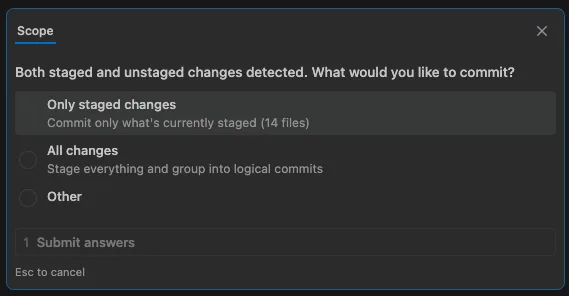
- Interactive scope selection. When both staged and unstaged changes exist, it asks whether to commit only staged or all changes
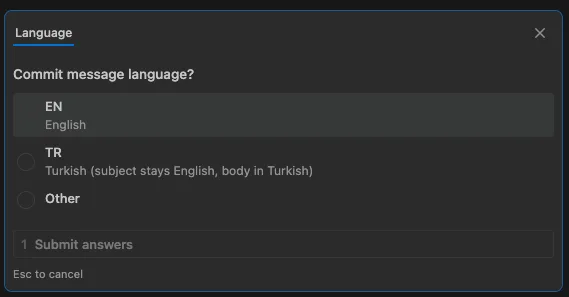
- Language support. Always asks your preferred language before generating messages. Subject line stays English per Conventional Commits standard, while the body is written in your chosen language
- Rich commit messages. Generates detailed body with bullet points when changes touch 2+ files or the diff exceeds 30 lines
- Batch commit grouping. In batch mode, groups unrelated changes into separate logical commits by module, file affinity, and change intent
- Smart file pairing. Keeps related files together: implementation + test, component + styles, manifest + lock file, migration + rollback
- Edge case handling. Binary files, large diffs, lock files, merge conflicts, pre-commit hook failures, and submodule changes are all handled gracefully
Getting Started
Quick Install
The fastest way to install is with a single command:
npx claude-commit-skillThis downloads the package, runs the installer script, and copies the skill files to ~/.claude/skills/commit/. No manual configuration needed.
Manual Install
If you prefer to inspect the source first:
git clone https://github.com/mustafakbaser/claude-commit-skill.gitmkdir -p ~/.claude/skills/commitcp -r claude-commit-skill/SKILL.md claude-commit-skill/references ~/.claude/skills/commit/Success
/commit command will be available globally across all your projects.How It Works
When you run /commit, the skill executes a well-defined sequence:
- 1Gather context: reads
git status,git diff, and recent commit history - 2Determine scope: checks if there are staged changes, unstaged changes, or both, and asks what to include
- 3Request language preference: asks whether you want the commit body in English or Turkish
- 4Analyze changes: examines the diff to determine the appropriate commit type, scope, and description
- 5Execute and verify: creates the commit and confirms success
Let's walk through a real example. First, the skill detects both staged and unstaged changes and asks you to choose the commit scope:
Next, it asks your preferred language for the commit body. The subject line always stays in English per the Conventional Commits standard, but the body can be written in your chosen language:
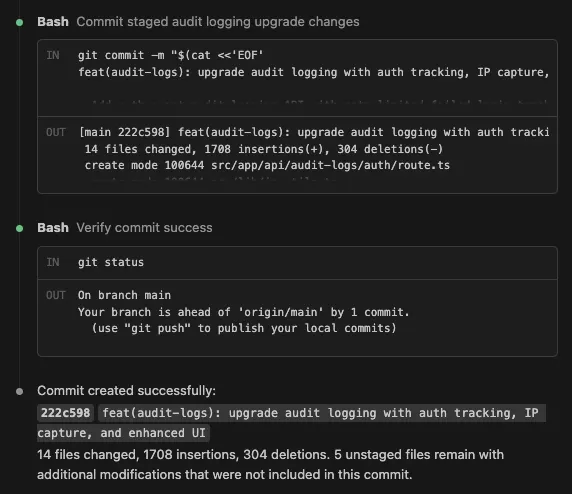
Finally, the skill analyzes the diff, generates a well-structured commit message, executes the commit, and verifies success:
Single Commit Mode
When you have staged changes ready to commit, the skill generates a single, well-structured message. Here's an example with an English body:
feat(contracts): add PDF generation for contract renewals - Add PDF generation support for contract renewal workflows- New template system supports all 7 contract types- PDF generation runs asynchronously via Edge Functions- Upload generated files to Supabase Storage with signed URLsAnd here is the same change with a Turkish body. The subject line is untouched, so changelog generators and anything else that parses your history keep working:
feat(contracts): add PDF generation for contract renewals - Sözleşme yenileme işlemleri için PDF oluşturma desteği eklendi- Yeni şablon sistemi ile 7 farklı sözleşme tipi destekleniyor- Edge Function üzerinden asenkron PDF üretimi yapılıyor- Oluşturulan dosyalar signed URL ile Supabase Storage'a yükleniyorBatch Commit Mode
When nothing is staged or the --all flag is passed, the skill switches to batch mode. It groups all changes by logical affinity, presents a commit plan, and waits for your approval before executing:
Proposed commits: 1. feat(wizard): add discount calculation to pricing step - src/components/wizard/PricingStep.tsx - src/lib/pricing.ts 2. fix(db): correct meeting balance view - supabase/migrations/20250102_fix_balance.sql 3. chore: update dependencies - package.json - package-lock.jsonThe grouping algorithm runs in five phases: affinity pairing (matching related files), directory clustering (grouping by shared path), semantic separation (feature vs fix vs config), balancing (targeting 2-5 commits), and ordering (infrastructure first, docs last).
Smart File Pairing
One of the most useful features is automatic file pairing. The skill understands that certain files belong together and should never be split across commits:
- Implementation + Test.
UserService.tsandUserService.test.tsalways stay together - Component + Styles.
Button.tsxandButton.module.cssare grouped as one change - Manifest + Lock file.
package.jsonandpackage-lock.jsonare always committed together - Migration + Rollback. Database migration files and their rollback counterparts are paired
Commit Message Format
The skill follows strict formatting rules to ensure consistency:
| Rule | Requirement |
|---|---|
| Format | type(scope): imperative description |
| Subject | Always English, max 72 characters, imperative mood |
| Body | Written in chosen language (EN/TR), included when 2+ files or >30 line diff |
| Body style | Bullet points summarizing what changed and why |
| Scope | Derived from primary module (db, ui, api, auth, etc.) |
| Omitted scope | When changes span 3+ unrelated modules |
Supported commit types: feat, fix, refactor, perf, style, docs, test, chore, ci, security, revert.
Edge Case Handling
Real-world repositories are messy. The skill handles the edge cases that trip up most commit tools:
| Scenario | Behavior |
|---|---|
| Binary files | Included in commit, content not analyzed |
| Lock files | Always grouped with their manifest file |
| Large diffs (>1000 lines) | Uses --stat + partial read for context |
| Untracked files only | Staged and committed as feat or chore |
| Pre-commit hook failure | Reports error, does not retry or use --no-verify |
| Merge conflicts | Aborts with message to resolve first |
Start Writing Better Commits Today
Good commit messages are a form of documentation that lives forever in your repository. With claude-commit-skill, you get structured, meaningful commits without the mental overhead of crafting them by hand every time.
If you're already using Claude Code, getting started takes exactly one command:
npx claude-commit-skill
Mustafa Kürşad Başer
Senior Software Engineer
A passionate software engineer who enjoys creating elegant solutions to complex problems. Beyond coding, I am deeply interested in exploring the intersections of technology, art, and human consciousness.